Calling & keys
Dashboard → Calling → API keys, or ?tab=keys. This is where a caller key is
minted and bounded.
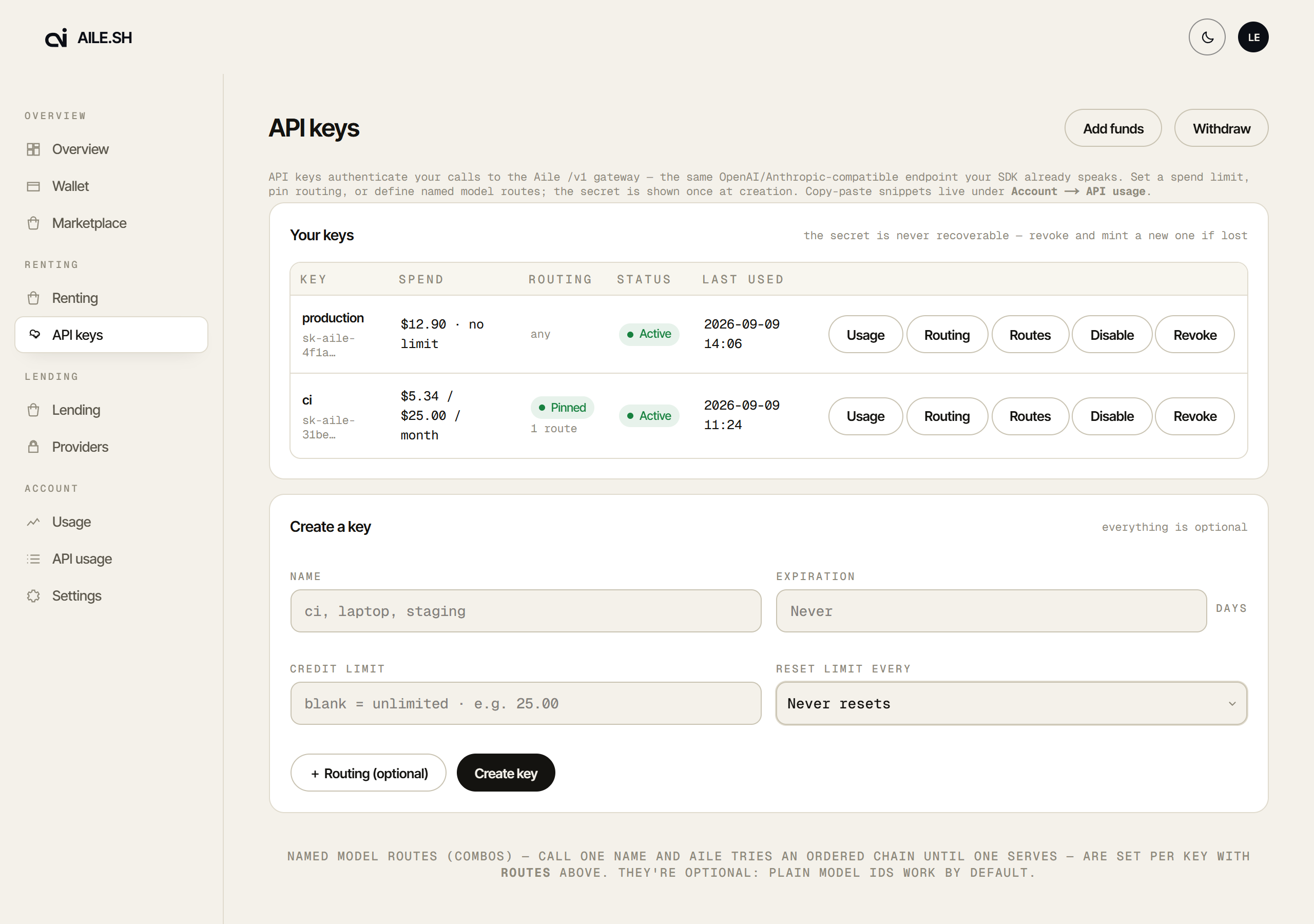
Minting a key
Create key asks for three optional things: a name, a spend limit with how often it resets (daily, weekly, monthly or never), and an expiry (7, 30 or 90 days, a year, or never). Routing is set after the key exists.
The full value is sk-aile- plus 48 hex characters, and it is shown once.
Only a hash is stored, so a lost key is replaced. It cannot be recovered.
The same dialog shows both base URLs (https://api.aile.sh/v1 for OpenAI SDKs,
https://api.aile.sh for Anthropic SDKs and Claude Code) and a quickstart per
coding tool with the new key already filled in. More tools are on
Connect tools (?tab=tools).
The sk-aile- prefix is deliberate: a key that leaks into a log or a repository
is recognisable to the scanners that look for exactly this shape.
Spend limits
A limit is set on the key. When a key reaches its limit it stops serving rather than drawing further on your balance, so one runaway integration cannot spend what the rest of the account holds.
The row shows spent against limit, so a key approaching its ceiling is visible before it stops.
Routing
A key's Routing button holds its rules and its named routes, on two tabs: Rules and Model routes. Creating a key sets no routing; the dialog offers Set up routing once the key exists, then returns to the key.
The rules are the levers a request can send as headers, attached to the key, for clients that cannot set custom headers, which is most editor integrations. The Rules tab groups them in four sections: Providers, Price, Sharers and Privacy.
| Rule | Header equivalent |
|---|---|
| Providers | |
| Provider | x-aile-provider (a key pinned to one provider can send bare model ids) |
| Any provider (a hint, not a setting) | auto/<model> in the request, or x-aile-provider: any; an older key's Let a bare model id use any provider shows only while it is on |
| Never these providers | x-aile-exclude-provider (the header only adds to the key's list) |
| Price | |
| Discount | x-aile-max-price: 80% (20% off the higher of the model's published input and output rates, for input and output alike; models with no published price are refused) |
| Max discount | x-aile-min-price: 20% (at most 80% off list: a sharer priced further below is skipped) |
| Max cost per request (USD) | x-aile-max-cost (the header can only lower it) |
| Sharers | |
| Only these sharers | x-aile-sharer with several handles (the header can only pick among the key's) |
| Never these sharers | x-aile-exclude-sharer (the header only adds to the key's list) |
| Prefer speed over price | None: chat requests try the fastest sharer first |
| Move sharers that keep failing to the back | None: a sharer that keeps failing this key is tried last for a while |
| Keep a conversation on one sharer | None: unticked, a conversation is no longer pinned to an account |
| Sharer handle (Advanced) | x-aile-sharer with one handle |
| Node id (Advanced) | x-aile-node |
| Privacy | |
| Allow self-hosted model | None: unticked, the key never uses self-hosted capacity |
| Only providers that do not train on prompts | x-aile-data-collection: deny |
Older keys may also carry verified only or an absolute Max $/Mtok. They keep working and can be removed from the same dialog.
Sharer lists, excluded providers and any provider
Only these sharers and Never these sharers, under Sharers, hold sharer
handles, the L + 16 hex shown on each marketplace card. Type or paste them,
comma-separated; a handle in the wrong shape is shown in red with the reason, and
the dialog will not save until it is fixed. Each list takes up to 50. Never
these providers, under Providers, is a provider search: add one, remove one
with its ×, up to 50.
All three are key-wide: they bind plain model requests, every route target
and auto/ requests, unlike the single sharer and node pins under
Advanced. Blank means no limit, so an empty Only these sharers is any
sharer, and one listed sharer makes it the only one. Only these sharers also
turns the stake-funded discount off for the key. Never these sharers and the
Max discount turn it off for a request when they removed the sharer that
would have been tried first, including one tied on price with the cheapest sharer
left. See Choosing a sharer.
The /market order book has the same thing as two links on the picked sharer: Block on a key and Allow on a key put that sharer on one of your keys' lists. Blocking takes it off the allowed list and allowing takes it off the blocked one; allowing a sharer on a key pinned to one sharer keeps both, as a list. The key's saved settings are read again just before the change is written, so an edit made elsewhere is not lost, and the only sharer a key allows cannot be blocked from there. A sharer whose recent uptime or cut rate is poor says so beside the links.
Any provider is not a key setting: under Providers the dialog says to write
auto/ instead of a provider, so auto/claude-sonnet-5 is tried at each provider
that lists it, cheapest first, up to six, never self-hosted. It does not work on a
key with a single Provider set. Its requests show in the key's traces and spend
under no route name. A key that still has the older Let a bare model id use any
provider on (a bare id with no prefix, optionally limited by Only these
providers) shows it there until it is unticked and saved; new keys do not offer
it. See Any provider for a bare model.
A conversation's sharer, and sharers that keep failing
Keep a conversation on one sharer is on for every key. Each conversation goes back to the account that served it before, by the session id your client sends or, from its third turn, by the conversation itself, so the provider's prompt cache and the model's earlier reasoning are reused. Untick it and every request goes to the cheapest sharer afresh; the session id still reaches the provider, only Aile's own pin stops. See Session affinity.
Move sharers that keep failing to the back is off until you tick it. Then a sharer that fails this key's requests 3 times within 5 minutes is tried last for the next 10 minutes. It is never skipped, so a model with one sharer still serves, and other keys are not affected. Only the sharer's own failures count; see Sharers that keep failing.
Both cover the whole key and every route, so a route target cannot carry either.
Max cost per request, and speed over price
Max cost per request (USD) is the most one request made with the key may be
charged. A sharer quoting more is passed over; when none quotes less, the request
is refused with a 402, or a route moves on to its next target. If the provider
reports more usage than was quoted, you are billed the cap. Under a cap a request
is sent the output cap it is priced at, and one that output cap cannot bound
(n other than 1, a provider such as codex that sends no output cap) is refused
with a 400, as a route target is. On a stake key's fallback key, the cap binds
whenever the fallback pays, and the stake key's requests are always sent the
priced output cap. It binds agent tool calls too. Blank is no cap. A
route target can carry a lower one of its own, and a request can lower it with
x-aile-max-cost; nothing raises it. See
Capping the cost of a request.
Prefer speed over price is off until you tick it. Then chat requests try the sharers with the fastest first token first, and price breaks a tie. It may bill a dearer sharer's quote, your max price and cost cap still apply, and the stake-funded discount is not applied when speed changed who serves. A route can set its own. See Speed first.
A header can only narrow
A key pinned to claude that receives x-aile-provider: codex is refused. Request headers can tighten a pinned filter; they cannot loosen one.
Named routes
A route maps a name you choose to a provider and model, with an ordered fallback
chain. Requests then send your name in the model field:
1{ "model": "fast/summarise", "messages": [] }
A route name is matched before anything else, so it is exempt from the provider
rule and used as-is, slash and all. Each target names a provider: its own
field, the key's pin, or a prefix. Which entry in the chain served comes back as x-aile-combo-entry.
The key's provider, discount, max discount and self-hosted rules, and its sharer lists and excluded providers, bind every target, and a target's own discount can only be stricter. Sharer and node pins are set per target: the key's apply to plain model requests only. A route takes at most 10 targets; + Add fallback stops there.
Each route has more settings:
- Order: In order (the default) tries the first target, then the next only when it fails. Cheapest first tries the target with the cheapest list price first, a tie keeping your order. Round-robin takes turns on which target goes first; a conversation keeps its own starting target (by its session id, or from its second turn by the conversation itself).
- Move on if no first token within: 1 to 60 seconds, blank for no limit. A target that has not started answering in that time is dropped and the next one is tried. It needs two targets or more, and never applies to the last target tried, nor to a request that is not streamed. While a target is waiting, you receive nothing, not even headers, for up to that long. See Route order and first-token limits.
- Prefer: Follow key (the default), Speed or Price. Price keeps the route cheapest first even on a key that prefers speed.
- Daily budget (USD): what the route may be charged per day, from 00:00 UTC. Once spent, the route is refused until it resets. Blank is no budget.
Each target also has Budget and cost cap: its own Daily budget (once spent, the target is skipped and the next one tried, until 00:00 UTC) and its own Max cost per request, which applies when it is lower than the key's. Budgets are soft: requests already running finish and are counted, so a busy route can go over by one charge per request in flight. Two targets that call the same provider, model and sharer share one figure, so only one of them may carry a budget; the dialog and the server both refuse it on both. See Daily budgets.
Tick Auto: pick a tier per request to make the route an auto route: every target gets a Tier (light, standard or heavy) and an optional Reasoning effort, and Order goes away, since an auto route is always in order. Fill: mixed models and Fill: one model, three efforts lay the targets out for you to check; nothing saves until you press Save. See Auto routes.
Create a route across providers
The Model routes tab starts with Create a route across providers. Pick a
model, and every provider that lists it under the same name becomes a target,
cheapest first, up to 10. Names that only start the same (a dated or -thinking
variant) are listed but never added, and what the key's saved rules refuse, and
self-hosted capacity, is listed with the reason. + Add as route puts it in
the dialog to review: rename it, reorder it or drop targets, then Save.
The same thing is on /market: a chat model's Route across providers link adds the route for that model to the key you pick.
Export, import and copy routes
The Model routes tab has Export, Import… and Copy to key….
- Export downloads the key's saved routes as a
.jsonfile:{"aile":"routes","version":1,"routes":[…]}, every route and target with all its settings. - Import… takes such a file, or a bare list of routes, dropped or pasted (up
to 1 MB). Before anything is saved it lists what changes, and you choose how the
routes meet the key's own: Replace same names (the default: an imported route
replaces the key's route of the same name, and the rest are added), Keep both
(a name already taken is added as
name-2,name-3…) or Replace all (the key keeps only the imported routes). - Copy to key… adds this key's saved routes to another of your keys, with the same choice. It is saved as soon as you press Copy.
Each is checked against the rules of the key it lands on when it is saved, the same as a route you add by hand, so a route that key would refuse (an excluded provider, a sharer it blocks or does not allow) is refused with the reason and nothing is saved. Export, copy and dry run use the saved routes, not unsaved edits, and an import replaces unsaved edits, so save or cancel them first.
Dry run
Dry run on a saved route, or Dry run a request… on the Rules tab,
shows what a request would do without sending it: give a model or route name,
the endpoint, and optionally a provider (or any), a max price, a price floor, a
cost cap, sharers to allow or exclude, providers to exclude, a session id and a
request body. It lists
each target in the order it would be tried (for auto/<model>, each provider it
would try), what would refuse it before any sharer (a spent budget, a cost cap no
sharer fits, a body the cost cap cannot bound, …), the sharers your filters
removed by name, how many others are unavailable or passed over for their own
reasons, and up to 50 sharers left in order with their quote, test and speed,
marking the one tried first. A body is at most 1 MiB. Nothing is charged or sent.
See Dry-run a route.
Disabling and revoking
Disable stops a key immediately, and Enable turns it back on. Revoke is permanent; usage history is kept. Either way, in-flight requests are not retroactively refunded, and nothing else on the account is affected.
A key marked Stake is the account's stake key. It cannot be revoked here; it is rotated on the staking page.
Spend by key, tag or app
The Account → Usage tab has a Spend by key, tag or app card with your last 30 days. Pick a grouping (key, tag, app or end user) to see requests, tokens and what you paid for each. Tags, apps and end users come from the headers in API keys.
Download CSV exports the last 90 days, one row per request, for your own books.
API usage
The Account → API usage tab has copy-paste examples with a key preselected. That is the fastest way from a fresh key to a working request. The Usage button on a key row jumps there with that key already chosen.
Below the examples, Requests lists the chosen key's requests from the last 30
days, newest first, with what each came to, how long it took and what you paid.
Route opens one: the targets in the order they were tried and, for each, the
sharers tried with what happened (served, rate-limited, provider error, at
capacity, no first token in time, under your price floor, …) and how long it took. The request id is the
reply's x-request-id. Load more reads older requests.
Alerts
Above the examples, the chosen key's alerts say what its last 24 hours of requests, today's route budgets and its spend limit suggest you look at. A key with alerts also shows their count on its row in Calling → API keys; the chip opens this tab. Nothing is sent anywhere: they are worked out when you look.
| Alert | When |
|---|---|
| Route falls to its last target | At least 30% of at least 20 requests on a route reached its last target. |
| Route failing | At least 20% of at least 10 requests on a route failed (critical from 50%). |
| Sharer failing | A sharer you allowed or pinned in a route failed at least 5 attempts, and at least half of its attempts. It suggests Move sharers that keep failing to the back when the key has not turned it on. |
| Budget nearly spent / spent | A route or target has used 80% / all of today's budget. |
| No first token in time | At least 80% of at least 10 attempts on a target were cut by the route's first-token limit. |
| Spend limit nearly reached | The key has used 80% of its spend limit (critical once it is used up). |
| Cost cap refusals | At least 5 sharer quotes were above the key's or a target's cost cap: per route target, and for requests of no named route per provider and model. |
Spend by route
Below the examples, Spend by route shows what the chosen key paid over the
last 24 hours, 7 days or 30 days, three ways: by route, by route target and by
the sharer that served it, each with requests and tokens. Requests that used no
named route but tried several targets (any provider, or the key's unnamed route),
and requests from before route names were recorded, are grouped as No route
name. Saved vs list
re-prices the same tokens at today's published list price, so it is an estimate,
and it is left out where that would mislead. It is GET /keys/usage/spend while
signed in.
For the full integration, see Your first request.