Providers
Dashboard → Sharing → Providers, or ?tab=providers. This is the custody
boundary's web surface: where a provider credential is handed over, and where you
can see what has been done with it.
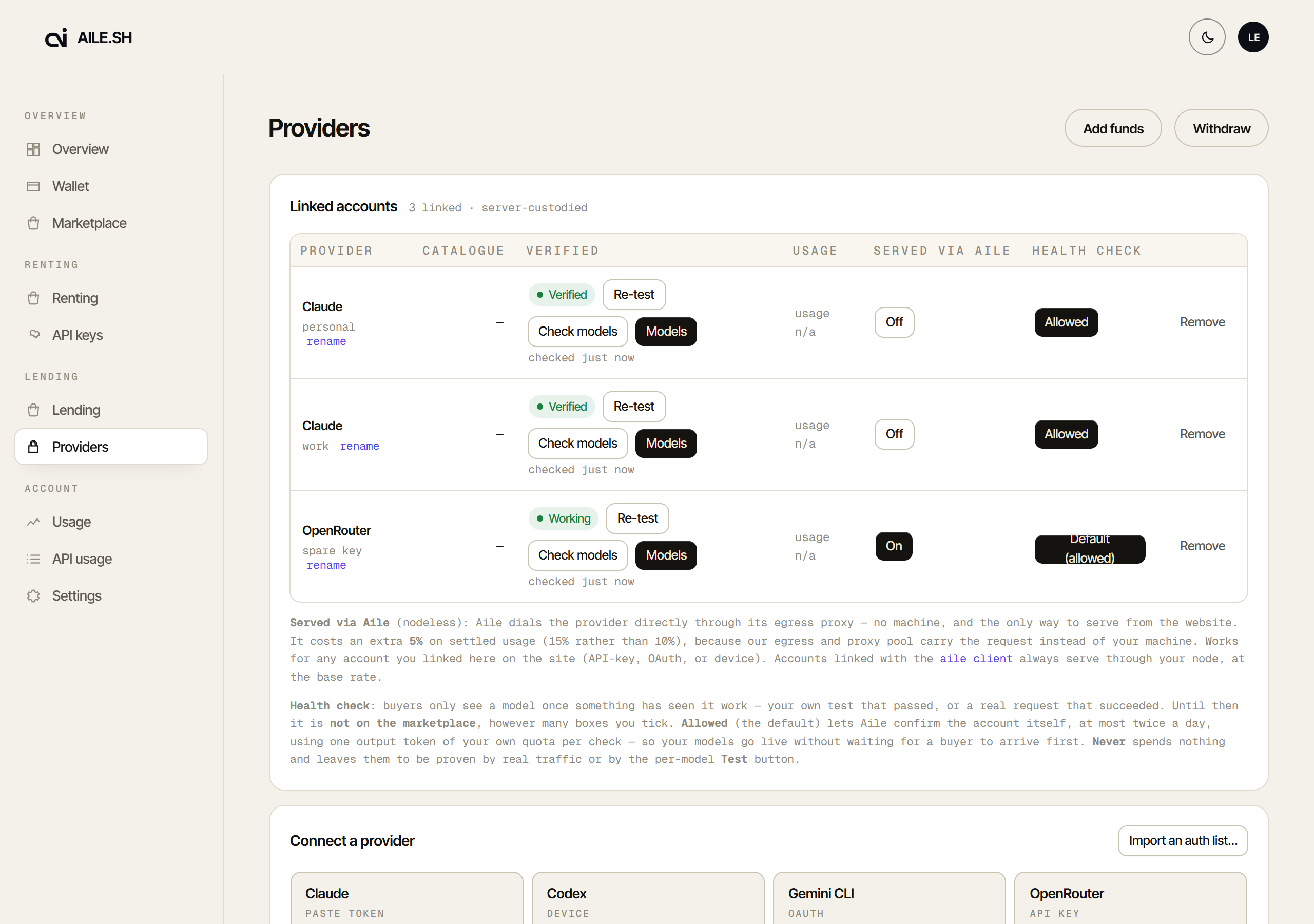
The columns
Provider and label. The label is yours and cosmetic; the relay never routes on it. Rename in place.
Verified. Two independent facts, shown as two things:
- Verified: a provider signed a nonce during the link. Attestable providers only.
- Working: the credential answered a probe recently. This is what Check key refreshes.
An API key can only reach Working, because nothing signs a key exchange. That is a property of the kind. See Verification.
Route. How Aile reaches the provider; it says nothing about whether anything is on sale. Node only means the account serves only while one of your machines is connected; Direct (nodeless) means Aile dials the provider itself and it keeps serving with your box switched off.
Direct costs an extra 5%
A nodeless serve settles at 15% rather than 10%, because Aile's egress and proxy pool carry the request instead of your machine. It also removes the node-side kill switch. For a subscription it is a real person's account served from Aile's egress. The CLI will not turn that on; this switch will. Nodeless.
Catalogue. How many models the provider publishes. Models shows which of them this account offers.
Listed. How many of the models you offer are listed, such as 3 of 12. While any is untested the cell adds the count and opens Models, where Test & Save lists them.
Usage. The quota the provider reports for the account, where it reports one. A GitHub Copilot account shows its premium requests as used of allowance; running out of them does not stop its base models serving.
Health check. Whether Aile may confirm the account itself with one short request on your own quota (a few tokens; a model that thinks first may spend up to 512), where the deployment runs these checks, at most twice a day. It is asked when you link, as Let Aile health-check this account, ticked by default.
- Allowed (the default, shown as Allowed (default) until you answer): a node-backed account's models are tested when you link it, and where the deployment runs the automatic test, Aile also tests the models you offer for you, at most 25 a day on your quota.
- Never: spends nothing. A model lists only after you press Test. Re-linking the account keeps it; only this toggle turns it back.
A model lists after it passes a test. Until then it is not on the marketplace, however many boxes are ticked, though a caller who names it is still served.
Out of credits. The provider refused for an empty balance, so the account is off the marketplace. Top up, then press Check key. Where the deployment runs health checks and the account allows them, a top-up is also noticed on its own, with one small request on the cheapest model already proven.
Spending limit reached. The key hit the spending limit set on it at the provider. Once the limit resets, or you raise it, press Check key.
Benched: test a model or re-link. The provider refused a real request with this key as invalid or expired. Check key cannot lift this, because a key check can pass for a key that cannot generate. A passing model test or a successful request clears it; otherwise create a new key at the provider and re-link.
Connecting an account
Connect a provider lists what this deployment supports, split by how the link works: sign in with the provider (OAuth or device code) or paste an API key.
Import an auth list takes a credential file you already have rather than re-authenticating each account by hand.
A subscription link shows a short notice first: linking lets Aile relay other people's requests through your account, under Aile's Terms of Service. Many providers' own terms restrict resale too; that risk to the account is yours.
Linking an API key you already linked updates that account instead of adding a second one. A Health check set to Never survives the re-link.
An API key the provider refuses outright is refused at link, before anything is stored. On OpenRouter that includes a management key and an expired key.
Cloudflare Workers AI also asks for your account id (32 hex characters), and the
token must be allowed to use Workers AI on that account. Link it here, or run
aile connect cloudflare-ai --account-id <id> --nodeless.
GitHub Enterprise Copilot asks for your Enterprise URL, a GitHub Enterprise
Cloud tenant (https://<tenant>.ghe.com), before its device code. GitHub
Enterprise Server hosts are refused.
The CLI equivalent, which is usually quicker if you are already at a terminal:
1aile connect # menu2aile connect codex --label work3echo "$KEY" | aile connect groq --key -
Models
Each account's Models button lists what it can serve, with a chip per model type. Models are ticked to offer them: Test & Save tests the ticked ones and keeps those that passed, and Offer only the N listed narrows to what is listed. The link wizard's model step has the same two buttons, Test & Save and Save, and ← All providers leaves without saving. A model lists after it passes a test, and each row's pill says where it stands: Listed, Untested, Failed, Can't sell or Off.
Check key re-checks the credential and Check plan asks which models your plan covers. Neither lists a model; a test does. On Codex, a test skips a model your ChatGPT plan does not carry and marks it Not on this account's Codex model list.
Serper has no free key check, so linking a Serper key and each Check key run one real search, billed to your Serper account. The background health check never runs it, and Serper accounts have no Check plan.
A ticked row that is not listed says why beside its name. Can't sell is a fact a test cannot change:
| Reason | What to do |
|---|---|
| Off in Pricing. | Turn the model on in the pricing panel. |
| No published price, so it is not sold. | Nothing; it is not sold at any margin. |
| Priced at $0, which is not sold. | A per-unit model needs a margin above 0. |
| Sells only on the Direct route. | Set Route to Direct. |
| No route: start your node or turn on Direct. | aile start, or Route → Direct. |
| Check the key first; then it can list. | Press Check key. |
| The provider refused this key. | Link a new key. |
| Add a wallet to get paid. | Set up your payout wallet. |
| The account's balance is too low for it. | Top up at the provider. |
| Re-link with your account ID. | Cloudflare: link again with the account ID. |
| No healthy proxy to reach the provider. | Wait; it clears when egress recovers. |
The rest name themselves: an account benched until its credential or plan is fixed, a model missing from the provider's own list, one the operator delisted. A model can also read Failed with the provider's own words, or "The provider says this account can't serve it right now" when the provider refused it for this account.
Speech, transcription, image, video, music, embeddings, rerank, moderation, OCR, web search and scrape models are listed too, each with its price per unit and, when it cannot sell, why (no list price, or Route is Node only). Like a chat model, each lists after it passes its test. Image, video and music tests generate real output billed to your account, so they run one row at a time and always ask first.
Per-model pricing
Below the account list, the pricing panel sets the same margins the CLI does:
list price × a margin from 0 (free) to 1 (list), overall or per model. The
panel shows it as a percent of list: 0% is list, -10% a margin of 0.9,
-100% free. Until you save one you serve at the platform default.
Each model's Serve switch only allows a sale: a model lists once an account offers it and it passes a test. A row that is on but not listed says why under its name, and the panel header counts them as offered, not listed.
1aile rates --margin 0.92aile rates set claude-opus-5 --model-margin 0.83aile rates off claude-opus-5
Prices are per (sharer, model): two keys for one provider share one price sheet. A per-unit model (images, audio, video, …) sells at list × margin by default, and a model with no list price is not sold. See Your rates.
What is stored
The credential is custodied and Aile-decryptable
Linking uploads the credential to Aile. It is encrypted at rest with a per-sharer key and decrypted on every request it serves, because the relay is what talks to the provider. This is the most sensitive store in the system. Read What Aile can see before linking anything.
Remove deletes the account server-side. It does not revoke anything at the provider; do that there too if that is what you meant.